

客户端服务器端渲染:10 分钟内构建组件化落地页⏱️
如今,如果没有使用 Next.js 或 Nuxt.js,就无法想象一个现代大型项目会是什么样子。
但是,如果任务是快速创建这样的结构,那么这里描述的这种方法就非常适合。
今天,我们将创建一个包含 5 个组件的小型落地页应用程序,这些组件位于服务器上。
我们开始吧!
📦 应用结构
我们的应用程序将具有与现代 SSR 应用程序类似的结构(当然,没有 BFF 等),但渲染将在客户端进行,并通过浏览器显示。
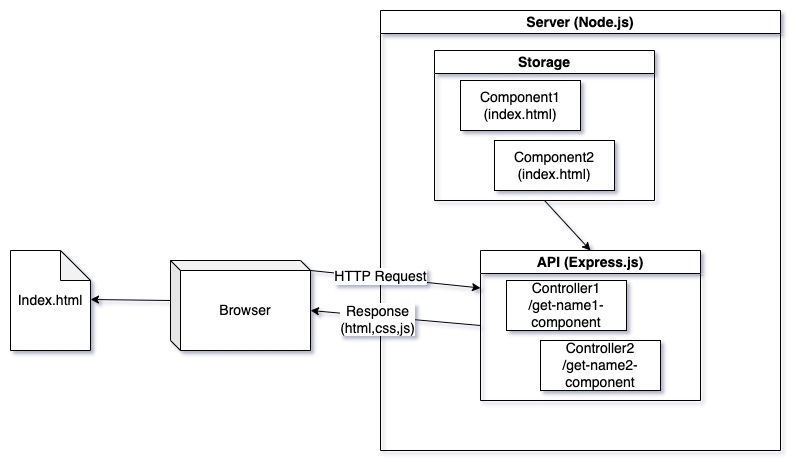
我们的架构中没有数据库的概念,因为数据将存储在 HTML 文件中。但是,如果我们要在着陆页上进行注册,我们可能需要一个.json符合现代数据库要求的文件,但这个示例需要在 10 分钟内完成,因此没有必要扩展功能。
此外,为了将客户端连接到服务器,我们将连接一个模块,例如 HMPL:
👀 如何开始开发一款应用?
首先,我们创建两个文件global.css。global.js它们将包含那些不依赖于服务器返回的内容的样式和脚本。
global.css
* {
  margin: 0;
  padding: 0;
  box-sizing: border-box;
  font-family: Roboto, sans-serif;
}

body {
  line-height: 1.6;
  color: #333;
}

.container {
  width: 100%;
  max-width: 1200px;
  margin: 0 auto;
  padding: 0 20px;
}

.section {
  padding: 80px 0;
  text-align: center;
}

.section h2 {
  font-size: 36px;
  margin-bottom: 30px;
}
global.js
console.log("Global scripts loaded");
因此,虽然可以不连接 global.js,但总的来说,如果我们有一些共同的 JavaScript 知识点,比如配置常量、实用函数等等,那将是一个很好的示例。
现在,我们将创建index.html 文件,并在其中连接着陆页所需的所有模块。
<!DOCTYPE html>
<html lang="en">
  <head>
    <meta charset="UTF-8" />
    <meta name="viewport" content="width=device-width, initial-scale=1.0" />
    <title>My Landing Page</title>
    <link rel="stylesheet" href="global.css" />
  </head>
  <body>
    <script src="https://unpkg.com/json5/dist/index.min.js"></script>
    <script src="https://unpkg.com/dompurify/dist/purify.min.js"></script>
    <script src="https://unpkg.com/hmpl-js/dist/hmpl.min.js"></script>
    <script src="global.js"></script>
  </body>
</html>
网站目前看起来是空的,所以我们来创建组件吧!
⚙️ 服务器配置
服务器端我们当然会选择 Node.js 平台。当然,你也可以选择其他平台,这对网站来说并非必要条件。框架方面,我们会使用 Express.js。
app.js
const express = require("express");
const path = require("path");
const bodyParser = require("body-parser");
const cors = require("cors");

const PORT = 8000;
const app = express();

const getRoutes = require("./routes/get");

app.use(express.json());
app.use(bodyParser.urlencoded({ extended: false }));
app.use(cors({ origin: true, credentials: true }));

app.use(express.static(path.join(__dirname, "src")));

app.get("/", (_, res) => {
  res.sendFile(path.join(__dirname, "src/index.html"));
});

app.use("/api", getRoutes);

app.listen(PORT, () => {
  console.log(`Server is running on http://localhost:${PORT}`);
});
routes/get.js
const express = require("express");
const expressRouter = express.Router();
const path = require("path");

const components = {
  title: "CTA",
  header: "Header",
  features: "Features",
  promo: "Promo",
  cta: "CTA",
  footer: "Footer",
};

Object.entries(components).forEach(([name, folder]) => {
  expressRouter.get(`/get-${name}-component`, (_, res) => {
    res.type("text/html");
    res.sendFile(path.join(__dirname, `../components/${folder}/index.html`));
  });
});

module.exports = expressRouter;
在介绍了几个 js 文件之后,我们现在可以在components文件夹中创建应用程序的各个部分了。
这些路线可以随意命名,但为了方便起见,我给它们起了名字。/api/get-${name}-component
⌨️ 编写第一个组件
我们先从横幅广告开始,因为这是我们在着陆页上的第一个内容模块。我们将直接从服务器路由的 URL 上添加它http://localhost:8000/api/get-features-component。
components/Features/index.html
<div id="features-component">
  <section id="features" class="section features">
    <div class="container">
      <h2>Our Amazing Features</h2>
      <div class="features-grid">
        <div class="feature-card">
          <h3>Fast</h3>
          <p>Lightning fast performance that saves you time.</p>
        </div>
        <div class="feature-card">
          <h3>Simple</h3>
          <p>Easy to use interface with no learning curve.</p>
        </div>
        <div class="feature-card">
          <h3>Reliable</h3>
          <p>99.9% uptime guaranteed for your business.</p>
        </div>
      </div>
    </div>
  </section>
  <style>
    .features {
      background: #f9f9f9;
      padding: 80px 0;
      text-align: center;
    }
    .features h2 {
      font-size: 36px;
      margin-bottom: 30px;
    }
    .features-grid {
      display: grid;
      grid-template-columns: repeat(3, 1fr);
      gap: 30px;
      margin-top: 50px;
    }
    .feature-card {
      background: white;
      padding: 30px;
      border-radius: 8px;
      box-shadow: 0 5px 15px rgba(0, 0, 0, 0.1);
      opacity: 0;
      transform: translateY(20px);
      transition: all 0.6s ease;
    }
    .feature-card h3 {
      margin-bottom: 15px;
      font-size: 22px;
    }
    @media (max-width: 768px) {
      .features-grid {
        grid-template-columns: 1fr;
      }
    }
  </style>
  <script>
    const animateFeatures = function () {
      const elements = document.querySelectorAll(
        "#features-component .feature-card"
      );
      elements.forEach((element) => {
        const elementPosition = element.getBoundingClientRect().top;
        const screenPosition = window.innerHeight / 1.3;

        if (elementPosition < screenPosition) {
          element.style.opacity = "1";
          element.style.transform = "translateY(0)";
        }
      });
    };

    window.addEventListener("load", animateFeatures);
    window.addEventListener("scroll", animateFeatures);
  </script>
</div>
现在,让我们看看它会是什么样子:

是的,服务器端的组件看起来不会很好,因为我们编写的样式仅针对它。但是当我们把所有这些部署到生产网站时,所有字体和其他元素都会同步,网站看起来就会很好。
✅ 让我们把剩下的部分写完。
一切运行正常,现在我们可以完成所有组件的编写,并使用 HTML 将它们连接到我们的系统中index.html。我们还将完成以下组件的编写:
- 标题:
http://localhost:8000/api/get-header-component - 促销:
http://localhost:8000/api/get-promo-component - 行动号召:
http://localhost:8000/api/get-cta-component - 页脚:
http://localhost:8000/api/get-footer-component
你可以在本站的代码仓库中找到完整的列表,我不会直接复制粘贴代码,因为那样文章篇幅会非常长。代码仓库的链接如下。
🔗 将所有内容连接到我们的网站
让我们将服务器请求的组成部分添加到我们的 html 中,并将生成的 html 附加到其中。
<!DOCTYPE html>
<html lang="en">
  <head>
    <meta charset="UTF-8" />
    <meta name="viewport" content="width=device-width, initial-scale=1.0" />
    <title>My Landing Page</title>
    <link rel="stylesheet" href="global.css" />
  </head>
  <body>
    <script src="https://unpkg.com/json5/dist/index.min.js"></script>
    <script src="https://unpkg.com/dompurify/dist/purify.min.js"></script>
    <script src="https://unpkg.com/hmpl-js/dist/hmpl.min.js"></script>
    <script src="global.js"></script>
    <script>
      const body = document.querySelector("body");
      const template = `
        <main>
            <!-- Header Component -->
            {{#request src="http://localhost:8000/api/get-header-component"}}{{/request}}
            <!-- Features Component -->
            {{#request src="http://localhost:8000/api/get-features-component"}}{{/request}}
            <!-- Promo Component -->
            {{#request src="http://localhost:8000/api/get-promo-component"}}{{/request}}
            <!-- CTA Component -->
            {{#request src="http://localhost:8000/api/get-cta-component"}}{{/request}}
            <!-- Footer Component -->
            {{#request src="http://localhost:8000/api/get-footer-component"}}{{/request}}
        </main>
      `;
      const { response } = hmpl.compile(template)();
      body.append(response);
    </script>
  </body>
</html>
值得注意的是,您可以通过interval属性为我们的组件添加加载器,或者为促销活动添加间隔请求。
🖥️结果
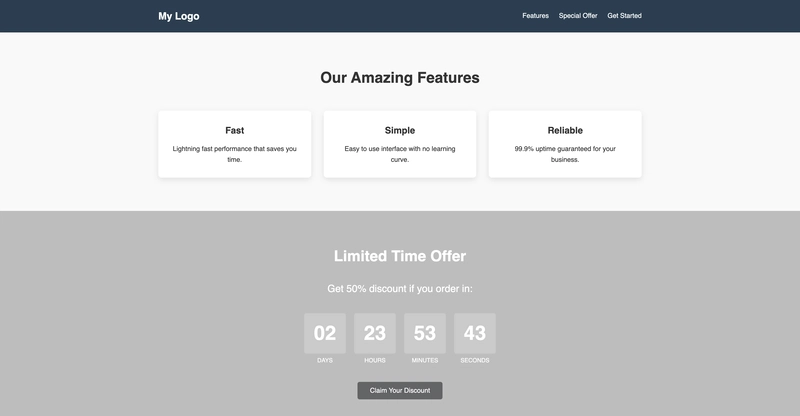
现在,让我们来看看我们花了十分钟(稍微多一点)的时间完成了什么:

在我看来,考虑到设计风格等方面并没有特别讲究,这看起来非常不错。
🖋️结论
在本文中,我们仅用 10 分钟就创建了一个小巧但非常酷炫且功能强大的应用程序,而且只使用了客户端的 SSR 技术。虽然使用 Next.js 也能实现同样的功能,但问题在于我们需要集成整个框架并完全依赖其结构,而在这里,我们只需集成一个模块就能获得相同的结果(无需搜索引擎爬虫)。
另外,如果您能用星星支持一下这个项目就太好了!谢谢❤️!
🗄️ 仓库链接
您可以在这里找到完整的代码:https://github.com/hmpl-language/examples/tree/main/landing
非常感谢大家阅读这篇文章!
